Using TrackFormat for Data Import#
In addition to the format-specific methods (readFromCsv(), readFromGpx(), and readFromWkt()), Tracklib provides a generic way to import track data using a TrackFormat.
A TrackFormat describes the structure of the input data independently of the underlying file format. Once defined, data can be loaded using a single generic method:
TrackReader.readFromFile(path, track_format)
A TrackFormat is a dictionary-like object that describes the layout of the input data. It gathers all import options into a single configuration, making them easier to reuse across multiple datasets.
Parameters#
General#
ext:ext: file format (CSV,GPX, orWKT). This parameter is mandatory and determines how files with the corresponding extension are read and written. The default value isCSV.
Coordinates#
id_E: index (starting from 0) of the column containing the X coordinate (ECEF), longitude (GEO), or East coordinate (ENU).id_N: index (starting from 0) of the column containing the Y coordinate (ECEF), latitude (GEO), or North coordinate (ENU).id_U: index (starting from 0) of the column containing the Z coordinate (ECEF), height, or altitude.srid: coordinate reference system of the input points (ENU,Geo, orECEF).
Time#
id_T: index (starting from 0) of the column containing the timestamp (either as Unix time or formatted according totime_fmt).date_ini: reference date (epoch) used when timestamps are stored as elapsed time. Ignored if set to-1.time_unit: unit of the timestamps (seconds, milliseconds, microseconds, or nanoseconds).time_fmt: format string used to parse textual timestamps (seeObsTime).
CSV Parsing#
separator: field separator. Predefined values arec(comma),b(blank space), ands(semicolon). Custom separators are also supported.header: number of header lines to skip.cmt: comment prefix. Lines starting with this character are ignored.doublequote: ifTrue, escaped double quotes are handled correctly.encoding: text encoding of the input file (default:"utf-8").no_data_value: value indicating an invalid record, which will be skipped during import.
Analytical Features#
read_all: ifTrue, all remaining columns are imported asAnalyticalFeatures.
Track Identification#
id_user: index of the column containing the user identifier (-1if not used).id_track: index of the column containing the track identifier (-1if not used).
Complete CSV Example#
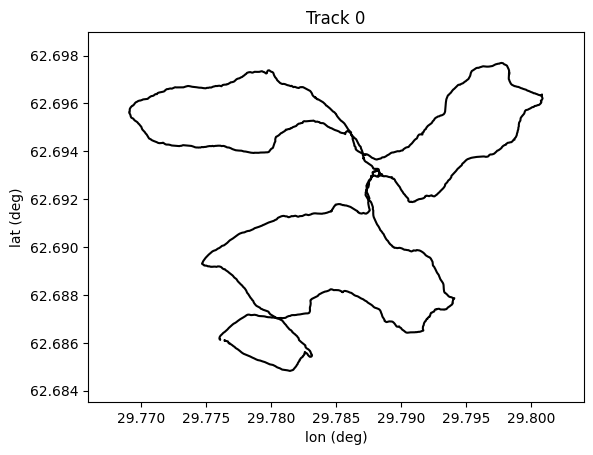
The following example shows how to load track data from a CSV file with:
coordinates in a geographic coordinate system,
timestamps stored in milliseconds since the Unix epoch,
a spatial filter that keeps only observations within a specified rectangular bounding box.
[1]:
import matplotlib.pyplot as plt

import os
import sys

# Import the Tracklib library
import tracklib as tkl

resource_path = '../../../data/mopsi/wgs84/'
filepath = os.path.join(resource_path, '1412412627743')

tkl.ObsTime.setReadFormat("4Y-2M-2D 2h:2m:2s")
initialDate = '1970-01-01 00:00:00'

Xmin = 29.76
Xmax = 29.81
Ymin = 62.68
Ymax = 62.70
ll = tkl.ENUCoords(Xmin, Ymin)
ur = tkl.ENUCoords(Xmax, Ymax)
bbox = tkl.Rectangle(ll, ur)
constraintBBox = tkl.Constraint(shape = bbox, mode = tkl.MODE_INSIDE, type=tkl.TYPE_CUT_AND_SELECT)
s = tkl.Selector([constraintBBox])

param = tkl.TrackFormat({'ext': 'CSV',
                     'id_E': 1,
                     'id_N': 0,
                     'id_T': 2,
                     'srid': 'Geo',
                     'time_ini': tkl.ObsTime.readTimestamp(initialDate),
                     'time_unit': 0.001,
                     'selector': s,
                     'separator': ' '})
collection = tkl.TrackReader.readFromFile(filepath, param, verbose=False)
collection.plot()
Code running in a no shapely environment